
Live DPS and HPS
Encounter average plus a rolling 5-second window, with a one-second timeline to pinpoint exactly when the damage happened.
Albion Meter reads the game’s traffic on your own computer and shows DPS, HPS, gear and each item’s contribution for the whole party in real time, with a history of every run.
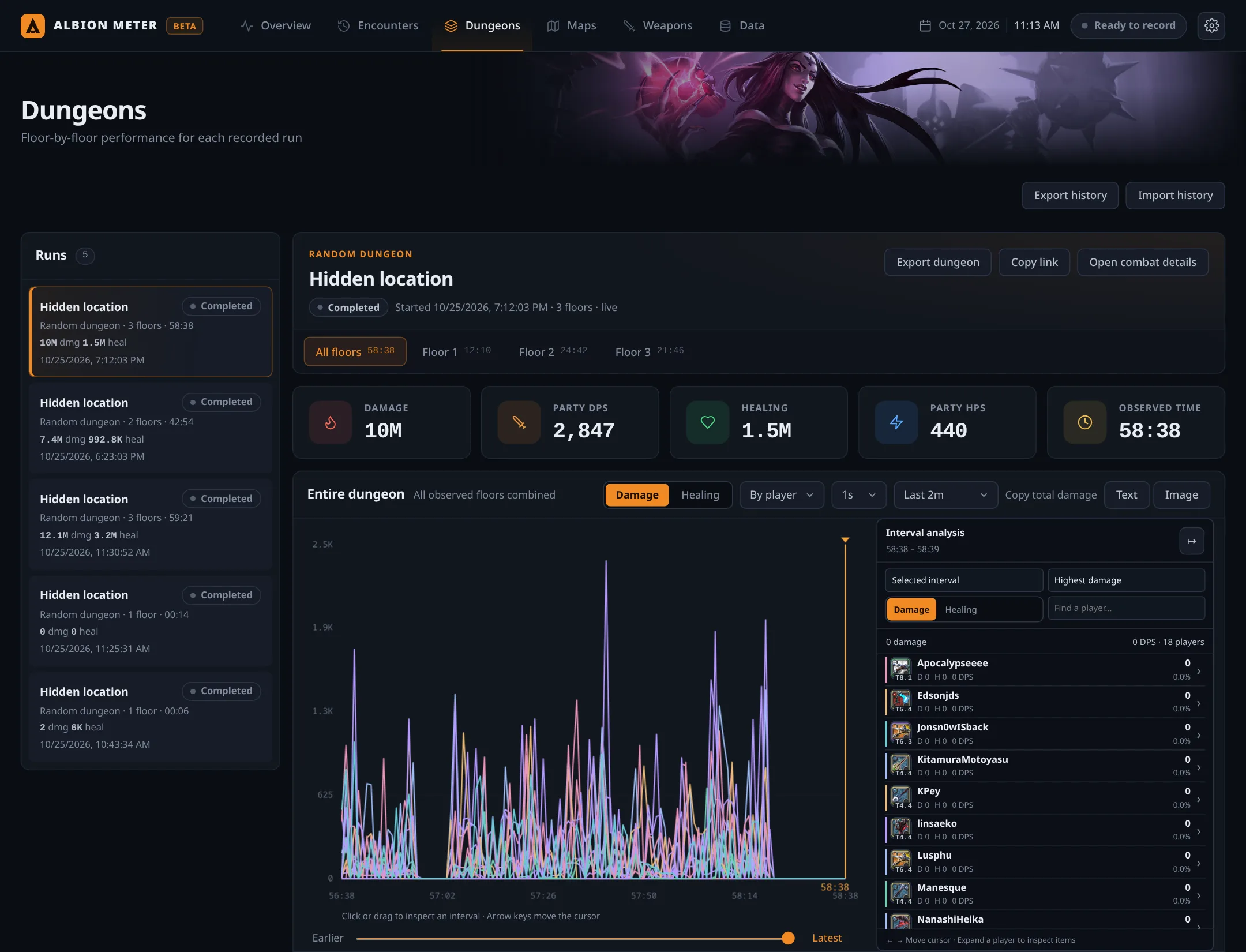
Real numbers from our last raid, recorded by the meter itself.
Encounter average plus a rolling 5-second window, with a one-second timeline to pinpoint exactly when the damage happened.
Every run becomes a record with its floors. Compare each player on floor 1, 2 and 3 side by side.
Splits what came from the weapon, the helmet or the cape, and how much was ability, auto attack or passive.
Players are recognized by character GUID, party list and gear. No guessing: anything not proven stays open.
Everything is saved in SQLite on your computer. Export any encounter as CSV or copy the ranking as text or an image.
No account, no external server, no uploads. The interface opens in your browser at 127.0.0.1 and your data never leaves your machine.
No made-up data: these numbers come straight from Albion Meter’s local history. Filter by floor, switch between damage and healing and open each player to see where every point came from. The dungeon location is hidden on purpose.
 T6.4
T6.4 T4.4
T4.4 T5.4
T5.4Every image was taken from Albion Meter opened on the history of this same raid.
Portable package with .NET included. Nothing else to install.
Run AlbionMeter.Server and open http://127.0.0.1:5187 in your browser. On Windows, accept the administrator prompt for capture.
Press Play in Overview. Every encounter and every dungeon floor is recorded and kept in the history.
Free and open to everyone. Check the SHA-256 checksum before opening the file.
Get help setting up capture, report bugs, suggest features, share your runs and be the first to know about new versions.
No. It only observes the network packets the game already receives on your computer. It does not inject code, read the client’s memory or automate any action.
No. Capture, processing and history all stay on your computer. The interface is served by the program itself at 127.0.0.1.
The game only sends other players’ gear at specific moments, such as entering a zone or an inspection. The meter only shows what the packets prove; damage per item still appears once its source is confirmed.
It is the healing observed in packets. Overheal is not subtracted yet, so the number represents healing applied, not health actually restored.
Yes. Every member who enters your field of view is recorded. Anyone not yet identified is kept and credited once their identity is confirmed.
No. The default is the system socket, which only needs administrator rights. If you already have Npcap, you can choose it in Data → Capture method.